
Blog Details
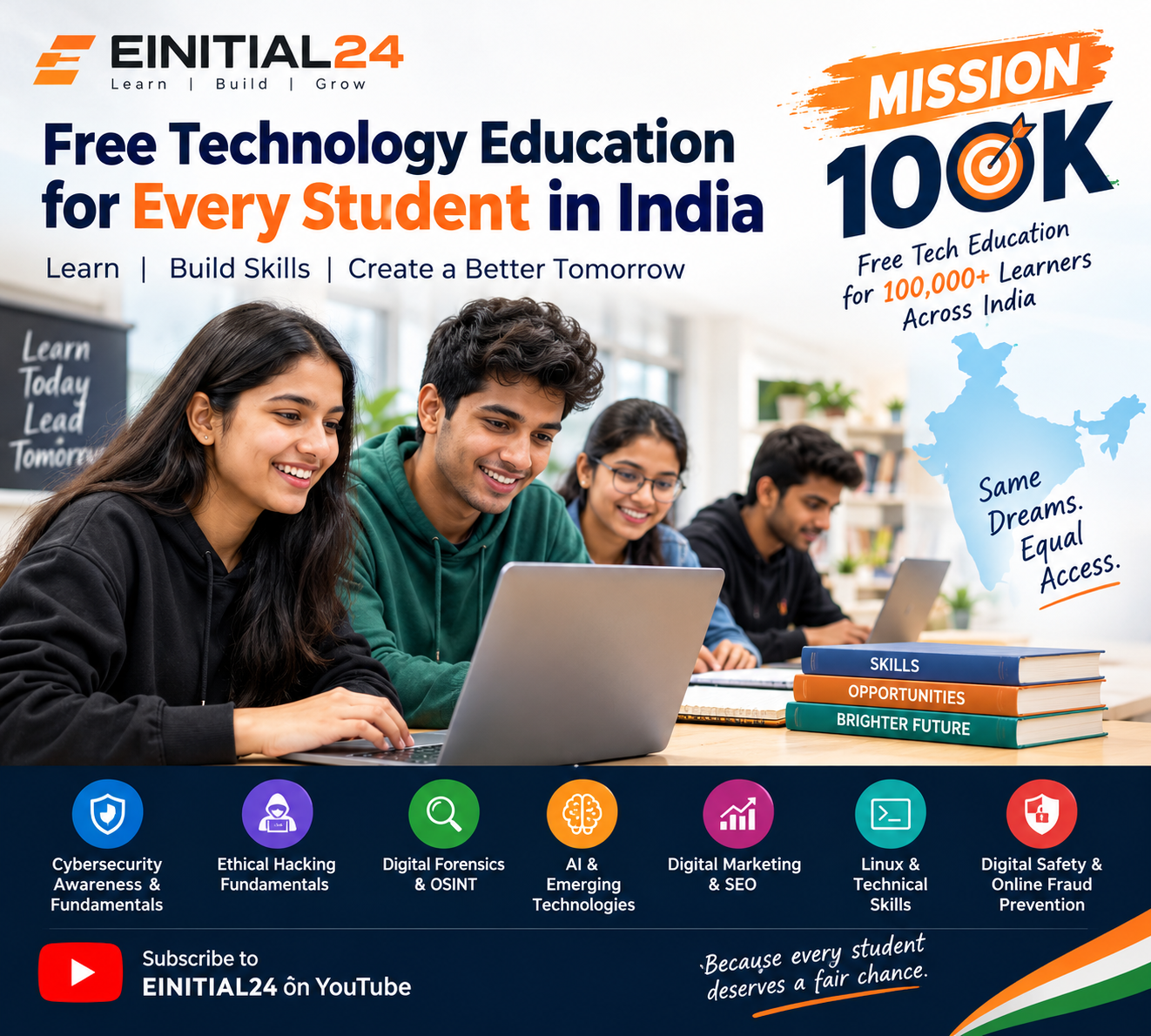
Free Technology Education for Every Student in India: Introducing EINITIAL24 Mission 100K
Learn technology for free. Build practical skills. Explore your future. Help make digital education accessible to 100,000 learners across India.
Technology is changing how people learn, communicate, work, and build businesses. From artificial intelligence and cybersecurity to digital marketing and software development, technology skills can open doors to new learning opportunities. However, many students still struggle to identify reliable learning resources, choose the right starting point, or afford specialized training.
For a student who wants to explore cybersecurity, a college learner interested in artificial intelligence, or a beginner hoping to understand digital marketing, one question often comes first: Where can I start learning without spending a lot of money?
EINITIAL24 Mission 100K is an initiative built around that question. Its goal is to make technology education accessible to 100,000 or more learners across India through free educational content on YouTube and related learning resources where available.
The idea is simple: a learner should have an opportunity to explore technology, understand its fundamentals, practise responsibly, and discover possible career directions without having to purchase an expensive course just to begin.
Through Mission 100K, EINITIAL24 aims to encourage a culture of accessible learning, digital awareness, and continuous skill development. Students, educators, colleges, community organizations, and potential CSR partners can all play a role in helping more people discover educational opportunities.
Start exploring free educational resources: Visit the EINITIAL24 YouTube channel.
What Is EINITIAL24 Mission 100K?
EINITIAL24 Mission 100K is a free-education initiative that aims to reach at least 100,000 learners across India with accessible technology-learning resources.
The initiative focuses on reducing the barriers that prevent beginners from exploring technical subjects. Rather than making paid enrolment the starting point, the mission encourages learners to begin with accessible educational videos, develop foundational knowledge, and gradually explore areas that interest them.
The mission's intended learning areas include cybersecurity, digital safety, ethical hacking fundamentals, digital forensics, OSINT, artificial intelligence, digital marketing, search engine optimization, Linux, and other essential technology skills.
The initiative is intended for students and self-learners from different educational backgrounds, including learners who have limited budgets or fewer opportunities to access specialized training.
Mission 100K is a target-led initiative. The goal is to reach 100,000 learners; that figure should not be interpreted as the number already reached. Progress should be communicated through verified channel analytics, participation records, learner feedback, and other appropriate evidence as the initiative develops.
The mission in brief
- Goal: Expand access to free technology education for 100,000 or more learners.
- Primary platform: EINITIAL24 on YouTube.
- Learning focus: Technology fundamentals, cybersecurity, digital safety, AI, digital marketing, and related skills.
- Intended audience: Students, beginners, self-learners, and learners from underserved communities.
- Approach: Accessible learning resources, self-paced study, responsible practice, and career exploration.
- Long-term aspiration: Encourage more learners to develop digital confidence and continue learning throughout their careers.
The mission is not simply about increasing video views. Its broader purpose is to encourage people to learn something useful, apply their knowledge responsibly, and take the next step in their educational journey.
Why Free Technology Education Matters in India
Technology education can be difficult to navigate when learners do not know where to begin or cannot afford specialized instruction. A student may have a strong interest in cybersecurity but lack access to a structured course. Another may want to learn SEO or AI but find it difficult to distinguish useful beginner resources from incomplete or outdated tutorials.
Free online learning can help reduce these barriers by providing a starting point.
1. The cost of learning should not prevent exploration
Professional training programs may include instructor support, practical laboratories, assessments, recognized certifications, and career services. These features can be valuable, but they may not be affordable or necessary for every beginner.
Free educational videos provide another way to explore a subject before committing to a paid program. Learners can understand basic terminology, discover whether a field interests them, and identify the knowledge they need to develop further.
For example, a student interested in cybersecurity can begin by learning about passwords, phishing, networking, operating systems, and security principles. After developing this foundation, the student can decide whether to pursue more structured training.
This approach helps learners make more informed decisions about their education.
2. Digital literacy is useful beyond technology careers
Digital literacy is not limited to people who want to become software developers or cybersecurity professionals.
Students use digital platforms for education, communication, research, and collaboration. Small businesses use online tools to reach customers. Professionals use digital systems to manage information and complete everyday tasks.
Understanding online safety, privacy, search engines, AI tools, and basic digital workflows can benefit people across many fields.
India's digital education ecosystem also includes initiatives such as SWAYAM Plus, which provides information about industry-aligned learning opportunities. These resources illustrate the range of ways learners can explore education and skills development online.
Mission 100K seeks to contribute to this broader learning culture by encouraging students to begin exploring technology through accessible educational content.
3. Students need direction, not just more videos
The internet contains an enormous amount of educational material. However, finding content is not the same as learning effectively.
Beginners may jump between unrelated tutorials, follow advanced lessons before understanding basic concepts, or stop learning when a topic becomes difficult.
A useful learning process should help students answer four questions:
- What should I learn first?
- What concepts do I need to understand?
- How can I practise safely?
- What should I learn next?
Mission 100K encourages learners to approach free educational content with a clear objective and a structured learning routine.
4. Online learning can expand access, but it has limitations
YouTube makes educational videos accessible to people in many locations, but access to a video does not automatically mean equal access to education.
Some students have limited internet connectivity, shared devices, restricted study time, or language barriers. Others need direct feedback and supervised practical experience to understand difficult concepts.
Free online learning is therefore most useful when learners can combine it with practice, discussion, revision, and support from teachers or peers where possible.
For communities with limited digital access, schools, colleges, NGOs, libraries, and other community organizations may help by arranging supervised viewing sessions, shared devices, or group-learning activities.
What Can Students Learn Through EINITIAL24 Mission 100K?
Technology is a broad field. Students do not need to master every subject at once. The best starting point is to understand the available learning areas and choose one based on personal interest.
The following sections explain the subjects Mission 100K aims to make accessible through its educational direction. Specific videos, playlists, and course availability should be checked on the actual EINITIAL24 channel.
1. Cybersecurity awareness and fundamentals
Cybersecurity focuses on protecting devices, networks, accounts, applications, and information from unauthorized access, misuse, disruption, and other threats.
For beginners, cybersecurity education should start with everyday safety.
Students can explore:
- Recognizing phishing emails and suspicious messages.
- Creating strong, unique passwords.
- Enabling multi-factor authentication.
- Keeping operating systems and applications updated.
- Understanding common online scams.
- Protecting personal information and privacy.
- Learning basic networking and computer-security concepts.
- Understanding the importance of authorization and responsible conduct.
Consider a student who receives a message claiming that their account will be suspended unless they click a link immediately. Cybersecurity awareness helps the student recognize urgency as a possible warning sign, inspect the message carefully, and verify the request through an official channel.
The Indian Computer Emergency Response Team (CERT-In) publishes cybersecurity advisories and awareness resources that learners can consult alongside educational videos. Its guidance on online scams explains common threats and preventive practices. https://www.cert-in.org.in/s2cMainServlet?VLCODE=CIAD-2024-0050&pageid=PUBVLNOTES02
Beginner activity: Review a fictional phishing message and list the warning signs without clicking any links or opening attachments.
2. Ethical hacking fundamentals
Ethical hacking involves assessing systems for security weaknesses within a clearly authorized scope.
It is different from attempting to access another person's account, device, website, or network without permission. Learning cybersecurity must include legal and ethical boundaries, not only technical concepts.
Beginners can explore:
- How computer networks communicate.
- What IP addresses, ports, and protocols are.
- How websites and applications work.
- Basic vulnerability concepts.
- Why security testing requires permission.
- How controlled cybersecurity laboratories support practice.
- The importance of responsible vulnerability reporting.
Students should practise only in environments they own or are explicitly authorized to test, such as intentionally vulnerable training applications or dedicated laboratory environments.
Beginner activity: Learn the difference between authentication, authorization, and access control, then explain how each contributes to application security.
3. Digital forensics fundamentals
Digital forensics concerns the identification, preservation, examination, and reporting of digital evidence.
It may involve computers, storage devices, mobile devices, network records, or other digital sources, depending on the investigation and applicable legal requirements.
Introductory learning can cover:
- What digital evidence is.
- Why evidence integrity matters.
- The difference between original evidence and working copies.
- Basic file-system concepts.
- Metadata and timestamps.
- Evidence documentation.
- The importance of maintaining records of evidence handling.
- Ethical and lawful investigation practices.
Digital forensics requires careful methodology. A file or screenshot alone may not establish the complete circumstances of an incident. Investigators must consider context, integrity, reliability, and other available evidence.
Beginner activity: Create a sample evidence log for fictional files, recording their filenames, collection dates, source descriptions, and handling notes.
4. OSINT and responsible online research
Open-source intelligence, commonly called OSINT, involves collecting and analyzing information from publicly available sources for a defined research purpose.
It can support legitimate activities such as cybersecurity research, fact-checking, threat awareness, and investigative work.
Learners can explore:
- Search-engine research techniques.
- Source verification.
- Basic domain and website research.
- Public records and publicly accessible information.
- Cross-checking information across independent sources.
- Recognizing misinformation.
- Documenting sources and research findings.
- Respecting privacy and legal boundaries.
Public availability does not automatically make every use of information ethical or appropriate. Learners should avoid harassment, unauthorized access, doxxing, and unnecessary collection or disclosure of personal information.
Beginner activity: Choose a public technology announcement and verify its date, source, and key claims using two reliable sources.
5. Artificial intelligence and emerging technologies
Artificial intelligence is increasingly relevant to education, research, business, content creation, and technical work.
Beginners do not necessarily need advanced mathematics or programming to start understanding AI. They can first learn what AI systems do, where they are useful, and where their limitations lie.
Useful introductory topics include:
- Basic AI and machine-learning terminology.
- Common applications of generative AI.
- Writing clear instructions for AI tools.
- Evaluating AI-generated answers.
- Recognizing hallucinations and unsupported claims.
- Protecting confidential and personal information.
- Responsible AI use.
- Exploring how AI relates to cybersecurity and digital marketing.
AI-generated information should not be treated as automatically correct. Students should compare important claims against trustworthy sources and use human judgment.
Beginner activity: Ask an AI tool to explain a basic technology concept, then verify its explanation against official documentation and record any differences.
6. Digital marketing and search engine optimization
Digital marketing helps organizations communicate with audiences through online channels. Search engine optimization, or SEO, focuses on helping search engines understand content and helping relevant users discover it.
Students interested in content, business, communication, and analytics can explore:
- Keyword research.
- Search intent.
- Website structure.
- On-page SEO.
- Content planning.
- Technical SEO fundamentals.
- Search performance measurement.
- Digital marketing strategy.
- Website usability and accessibility.
For example, a student learning SEO might compare two educational articles and examine how their titles, headings, explanations, and internal links help readers understand the topic.
SEO is not simply about repeating a keyword. Useful content should answer the searcher's question, provide reliable information, and make the next step clear.
Beginner activity: Create an outline for an article answering one specific question, such as “How can students protect their online accounts?”
7. Linux and technical foundations
Linux is widely used in technology environments, including servers, development workflows, and many cybersecurity laboratories.
Students exploring technical careers may benefit from learning basic operating-system concepts before moving to advanced tools.
Foundational topics include:
- Files and directories.
- Command-line navigation.
- File permissions.
- Basic process management.
- Networking concepts.
- Software installation and updates.
- System logs.
- Responsible use of administrative privileges.
Beginner activity: In a Linux environment you are authorized to use, practise listing files, navigating directories, and reading basic system information.
8. Digital safety and online fraud prevention
Digital safety is relevant to every internet user, regardless of technical experience.
Students and families may encounter impersonation attempts, fake job offers, fraudulent payment requests, malicious downloads, account-takeover attempts, or deceptive messages.
Useful learning topics include:
- How to recognize suspicious links.
- How to verify the identity of a sender.
- Why passwords and one-time passcodes should remain private.
- How privacy settings reduce unnecessary exposure.
- Why software updates matter.
- How to verify financial requests independently.
- What to do when an account may have been compromised.
CERT-In's Digital Safety Compass Handbook is an additional resource for learning about phishing and other digital safety practices.
Beginner activity: Prepare a personal account-security checklist and review the security settings of your own accounts.
How to Learn Technology for Free on YouTube: A Practical Guide
Watching videos can be a useful way to begin learning, but meaningful progress requires a plan.
Here is a practical approach students can use with EINITIAL24 and other reliable educational resources.
Step 1: Choose one learning goal
Start with a specific objective rather than trying to learn everything simultaneously.
Examples include:
- Understand cybersecurity fundamentals.
- Learn the basics of SEO.
- Become familiar with Linux commands.
- Explore artificial intelligence.
- Understand digital evidence.
- Improve personal digital safety.
A clear goal helps you decide which lessons are relevant.
Step 2: Start with foundational concepts
Do not begin with advanced material simply because it sounds impressive.
A cybersecurity beginner should understand basic computer and networking concepts before attempting complex security laboratories. Someone learning SEO should understand search intent and website structure before focusing on advanced optimization techniques.
Foundations make later learning easier.
Step 3: Use playlists or a structured sequence where available
If a channel provides a suitable playlist, follow it in order. Otherwise, create a list of topics and study them from introductory to intermediate levels.
Avoid switching between unrelated subjects every few minutes.
Step 4: Take notes
Write down definitions, key concepts, examples, and questions.
After each lesson, explain the main idea in your own words. If you cannot explain a concept without copying the instructor's wording, revisit the lesson.
Step 5: Practise what you learn
Practical activities help turn information into usable knowledge.
Depending on the subject, you might:
- Analyze a fictional phishing example.
- Write an SEO content outline.
- Practise Linux commands in a controlled environment.
- Verify a public claim using reliable sources.
- Document a fictional digital-evidence workflow.
- Build a small project using an AI tool.
In cybersecurity, never practise on systems or accounts without authorization.
Step 6: Review and revise
Revisit difficult lessons, test your understanding, and identify gaps.
You do not need to understand every concept immediately. Consistent revision is more useful than rushing through many videos without retaining the material.
Step 7: Build small projects
Projects help you organize what you have learned into something demonstrable.
A beginner might create a digital safety checklist, an SEO audit of a website they are authorized to review, a simple Linux command reference, or a research report based on public sources.
Document the objective, methods, findings, and limitations.
Step 8: Track progress honestly
Track the lessons completed, concepts understood, projects finished, and questions still unresolved.
Subscribers, views, and watch time can indicate engagement, but they do not by themselves prove learning. Your ability to explain concepts and complete practical tasks provides more meaningful evidence of progress.
A Four-Week Starter Plan for Beginners
This sample schedule demonstrates how students can organize their learning. It is illustrative, not an official EINITIAL24 course schedule.
|
Week |
Learning focus |
Suggested activities |
Intended outcome |
|
Week 1 |
Digital literacy and online safety |
Learn account security, phishing awareness, privacy, and basic computer concepts |
Develop safer digital habits |
|
Week 2 |
Technology and cybersecurity foundations |
Explore networks, operating systems, common threats, and security terminology |
Understand basic cybersecurity concepts |
|
Week 3 |
Explore one specialization |
Choose AI, SEO, Linux, OSINT, or digital forensics fundamentals |
Identify an area of interest |
|
Week 4 |
Review and beginner project |
Complete a small project, revisit difficult lessons, and document learning |
Build a foundation for continued study |
You can adapt the schedule to your available time. Some students may need more than four weeks to understand the fundamentals, while others may progress faster in areas they already know.
The objective is not to finish quickly. It is to learn consistently and build a stronger foundation.
Who Can Benefit from Mission 100K?
Mission 100K is intended to support learners at different stages of their educational journey.
School students
School students can begin with digital literacy, online safety, computer fundamentals, and introductory technology concepts. These topics can help them explore technology before choosing a specialization.
College students
College students may use free learning resources to supplement classroom education, explore new technical fields, and identify subjects for projects or further study.
Beginners exploring a career change
People considering technology careers can use introductory videos to understand different fields before investing in specialized training.
Students from rural and underserved communities
Free online resources can provide a starting point for learners who face financial or geographic barriers to specialized education, provided they have suitable access to a device and the internet.
Institutions and community organizations may help address access limitations through shared devices, group learning, or supervised educational activities.
Self-learners
People who prefer independent learning can use educational videos to revise concepts, explore new subjects, and build their own learning schedules.
Free resources are not a substitute for every form of formal education, supervised practice, or professional certification. They can, however, help learners discover what they want to learn and prepare for their next step.
How Colleges, NGOs, and Community Organizations Can Support Free Education
Reaching 100,000 learners is a substantial objective. It requires more than publishing educational content and waiting for people to discover it.
Educational institutions and community organizations can help make learning resources more visible and easier to use.
Colleges and universities
Colleges can share relevant learning resources with students, organize introductory digital safety sessions, and encourage students to complete small projects based on the material.
Faculty members can help learners distinguish foundational awareness from professional-level training and identify appropriate next steps.
Schools and educators
Educators can introduce students to age-appropriate digital literacy topics, online safety, responsible AI use, and basic technology concepts.
Learning activities should be appropriate for students' ages, access levels, and educational requirements.
NGOs and community organizations
NGOs may help identify learners who have limited access to training and explore ways to support participation.
Potential activities include group-learning sessions, community digital safety workshops, and sharing free educational resources with learners who could benefit from them.
Libraries and community learning centres
Where devices and internet access are available, community learning spaces can help learners access videos, complete guided activities, and study together.
How to explore collaboration with EINITIAL24
Institutions interested in supporting the mission can begin by reviewing the educational resources available through EINITIAL24.
Potential areas for discussion include:
-
Sharing relevant educational content.
-
Organizing cybersecurity awareness activities.
-
Supporting digital literacy and career-orientation sessions.
-
Exploring guided learning cohorts.
-
Identifying learners who need additional access support.
-
Discussing ways to assess learning and document participation.
These are possible collaboration models, not claims that every activity is already established. Any partnership would require discussion, agreement on responsibilities, and confirmation of the resources available.
The Role of CSR in Expanding Access to Technology Education
Corporate social responsibility can be one potential route for supporting education and skill-development activities, subject to applicable law and the eligibility of the organizations involved.
Companies, foundations, and other institutions may explore whether their priorities align with digital literacy, technology awareness, employability-related learning, or educational access initiatives.
Possible support models include:
Digital safety awareness: Introductory sessions on phishing, online fraud, privacy, and safe technology use.
Foundational technology training: Structured learning in cybersecurity fundamentals, AI awareness, Linux, or digital marketing.
Guided learning cohorts: Programs in which learners access online material and participate in scheduled activities, assessments, or mentoring where available.
Access support: Assistance with learning devices, connectivity, or supervised learning facilities, where included in an approved project.
Monitoring and reporting: Appropriate records of participation, assessments, learner feedback, and verified learning outcomes.
Before supporting any initiative, a prospective CSR partner should review the project design, beneficiaries, implementation arrangements, budget, compliance requirements, and measurement plan.
EINITIAL24 welcomes discussions about potential educational collaborations, but CSR eligibility, funding, and project approval cannot be assumed. They depend on the applicable legal framework, the implementing entity's eligibility, the project's design, and the sponsoring organization's procedures.
How Should the Impact of a Free Education Initiative Be Measured?
A mission focused on reaching learners should measure more than audience size.
Different indicators answer different questions.
|
Measurement area |
Example indicator |
What it tells you |
|
Reach |
Unique viewers or learners reached |
How many people may have encountered the resources |
|
Engagement |
Watch time, returning viewers, and playlist activity |
Whether people are interacting with the content |
|
Participation |
Workshop attendance or cohort participation, where applicable |
Who took part in a structured activity |
|
Learning |
Pre- and post-session assessments |
Whether knowledge changed during the measured period |
|
Application |
Completion of a practical task or project |
Whether learners can apply selected concepts |
|
Feedback |
Learner responses and topic requests |
What learners find useful or difficult |
|
Continuity |
Repeat engagement and continued learning |
Whether learners continue exploring the subject |
For Mission 100K, the target of 100,000 learners should be supported by a clear measurement method. YouTube analytics can provide useful audience information, but views should not automatically be counted as 100,000 distinct learners.
Likewise, attendance does not prove mastery, and completing a video does not guarantee employment.
A credible impact report should explain the indicators used, the period measured, the limitations of the data, and the distinction between intended outcomes and demonstrated results.
Common Challenges in Free Online Learning and How to Overcome Them
Free learning resources are valuable, but learners may encounter obstacles.
Challenge 1: Too much information
Solution: Choose one subject and define a small learning goal for the week. Save unrelated topics for later.
Challenge 2: Inconsistent study habits
Solution: Establish a realistic schedule. Even a short, focused study session can help maintain continuity when repeated regularly.
Challenge 3: Outdated tutorials
Solution: Check publication dates and compare important technical instructions against official documentation. This is particularly important for cybersecurity, AI, and software tools.
Challenge 4: Limited practical experience
Solution: Use controlled exercises, sample data, authorized laboratories, and small projects. Ask a teacher or knowledgeable peer for feedback when possible.
Challenge 5: Limited internet or device access
Solution: Consider shared devices, supervised learning spaces, lower-bandwidth resources, or downloadable materials where the publisher permits them.
Challenge 6: Unrealistic career expectations
Solution: Treat free videos as a foundation, not a guarantee of employment. Professional readiness may require deeper study, practical experience, communication skills, and other qualifications.
Challenge 7: Unsafe experimentation
Solution: In cybersecurity, use only authorized systems and controlled environments. Do not test tools against real websites, accounts, or networks without explicit permission.
Frequently Asked Questions About EINITIAL24 Mission 100K
1. What is EINITIAL24 Mission 100K?
EINITIAL24 Mission 100K is an initiative aiming to make free technology education accessible to 100,000 or more learners across India through YouTube-based educational content and related learning resources where available.
2. Is Mission 100K intended to provide free education?
Yes. The initiative's central goal is to make educational technology content freely accessible, helping learners begin exploring digital skills without requiring them to buy a course first.
3. How can students access the learning resources?
Students can visit the EINITIAL24 YouTube channel, explore the videos currently available, and choose topics relevant to their interests and experience.
4. Can beginners learn cybersecurity for free?
Beginners can learn cybersecurity fundamentals through free educational videos, official documentation, and suitable practice resources. Advanced skills generally require sustained study and practical experience.
5. Can I learn ethical hacking without paying for a course?
You can begin learning ethical hacking concepts for free through educational content and authorized practice environments. Ethical hacking requires permission to test a system and must be conducted within an approved scope.
6. What should students learn before starting cybersecurity?
A useful starting point includes computer fundamentals, operating systems, networking basics, online safety, and security terminology. Students can then explore more specialized topics.
7. Can YouTube help students develop technology skills?
Yes. YouTube can provide explanations, demonstrations, and opportunities to revisit lessons at a learner's own pace. Effective learning also requires practice, revision, and verification of important information.
8. What is the difference between cybersecurity awareness and professional cybersecurity training?
Cybersecurity awareness teaches people to recognize risks and follow safer practices. Professional training generally goes deeper into technical concepts, tools, investigation methods, and practical assessments.
9. Can students from rural areas benefit from online technology education?
Yes, where they have suitable access to devices and connectivity. Schools, NGOs, and community learning spaces can help reduce access barriers through shared resources and guided activities.
10. How can colleges and NGOs support Mission 100K?
They can explore sharing educational resources, organizing awareness sessions, supporting guided learning activities, and collecting learner feedback. Any formal collaboration should be agreed upon with EINITIAL24.
11. How can CSR organizations explore a collaboration?
CSR teams can review the initiative's objectives, proposed beneficiaries, implementation plan, budget, measurement framework, and applicable eligibility requirements before considering a potential partnership.
12. Does watching free videos guarantee a job or professional certification?
No. Educational videos can help learners build foundational knowledge, but employment and certification outcomes depend on additional requirements, demonstrated skills, assessments, and individual circumstances.
Join EINITIAL24 Mission 100K: Help More Students Start Learning
A student should not have to understand the entire technology industry before taking the first step. Sometimes, the first step is simply discovering a useful lesson, understanding a new concept, or realizing that a subject is worth exploring further.
EINITIAL24 Mission 100K aims to make that first step more accessible.
Whether you are a school student, college learner, beginner, educator, or organization interested in digital education, you can help expand the reach of useful learning resources.
For students: Start learning today
Visit the EINITIAL24 YouTube channel, explore the available educational content, and choose one topic to begin with.
Subscribe if the content is useful to you, save relevant videos for revision, and share them with classmates or friends who may benefit.
Your first goal is not to learn everything. It is to begin learning consistently.
For educators and institutions: Share the opportunity
Help students discover relevant technology-learning resources. Consider incorporating appropriate educational videos into study activities, digital safety discussions, or introductory career-orientation sessions.
For CSR teams and organizations: Explore educational collaboration
If your organization is interested in digital literacy, cybersecurity awareness, technology education, or skill-development initiatives, consider discussing potential areas of collaboration with EINITIAL24.
The appropriate structure, responsibilities, resources, and outcomes should be defined before a partnership begins.
For everyone: Help spread free education
You do not need to be a technology expert to help someone discover a useful learning resource. Sharing an educational video, encouraging a student to practise a new skill, or helping a learner find a reliable starting point can make learning easier to approach.
Mission 100K is a goal to expand access to free technology education for 100,000 learners across India. Help us move toward that goal—one learner, one lesson, and one learning opportunity at a time.
Start here: https://www.youtube.com/@EINITIAL24
Learn more about EINITIAL24: https://einitial24.com
EINITIAL24 focuses on technology education and digital skills, with learning areas including cybersecurity awareness, digital safety, technical fundamentals, digital marketing, and related subjects.
Through Mission 100K, EINITIAL24 aims to expand access to free educational content and encourage more learners to explore technology responsibly.
For information about the initiative, visit the EINITIAL24 website or YouTube channel.
Editorial note: The mission target, current content availability, organizational details, and any future partnership arrangements should be verified before publication. This article does not imply government endorsement, guaranteed employment, or confirmed CSR funding.
Additional learning resources
Recent Blogs

 in India Structure, Role, and Opportunities for Stakeholders.jpg)

.jpg)